Screen-time for families · iPad · PC · Switch

One screen-time budget across every device.

Playful Pause gives your kid one shared daily limit across the iPad, gaming PC, Nintendo Switch, and whatever comes next — with gentle wind-downs kids don't fight.

Coming soon to the App Store
Playful Pause showing one shared budget across iPad, gaming PC, and Nintendo Switch
Playtime onPC · Switch · iPad
Wind-down in 10 minBruce got a heads-up
Why it's different

Three things other screen-time apps get wrong.

They block. Kids dodge. Parents police. Playful Pause was built to undo all three.

Psychology, not punishment

Kids who actually want to stop

Other apps slam the door and trigger a meltdown. Playful Pause gives a gentle heads-up before time's up, then celebrates the stop with streaks and small wins — so handing the device back feels like a victory, not a punishment. The behavior change is the product.

One limit, every screen

No dodging to the backup device

Set the daily limit once and it covers the gaming PC, Nintendo Switch, iPad, and other paired devices as one shared budget. Run out on one, and there's no sneaking to another to keep going. The limit follows the kid, not the device.

Visibility without policing

Everything in one place — for you

Every device, every limit, and every "can I have more time?" lands on one screen. Approve, unlock, or lock everything with a single tap from your phone. You stay in the loop without standing over anyone's shoulder.

The kid-side off-ramp

It does not just say no. It points them somewhere better.

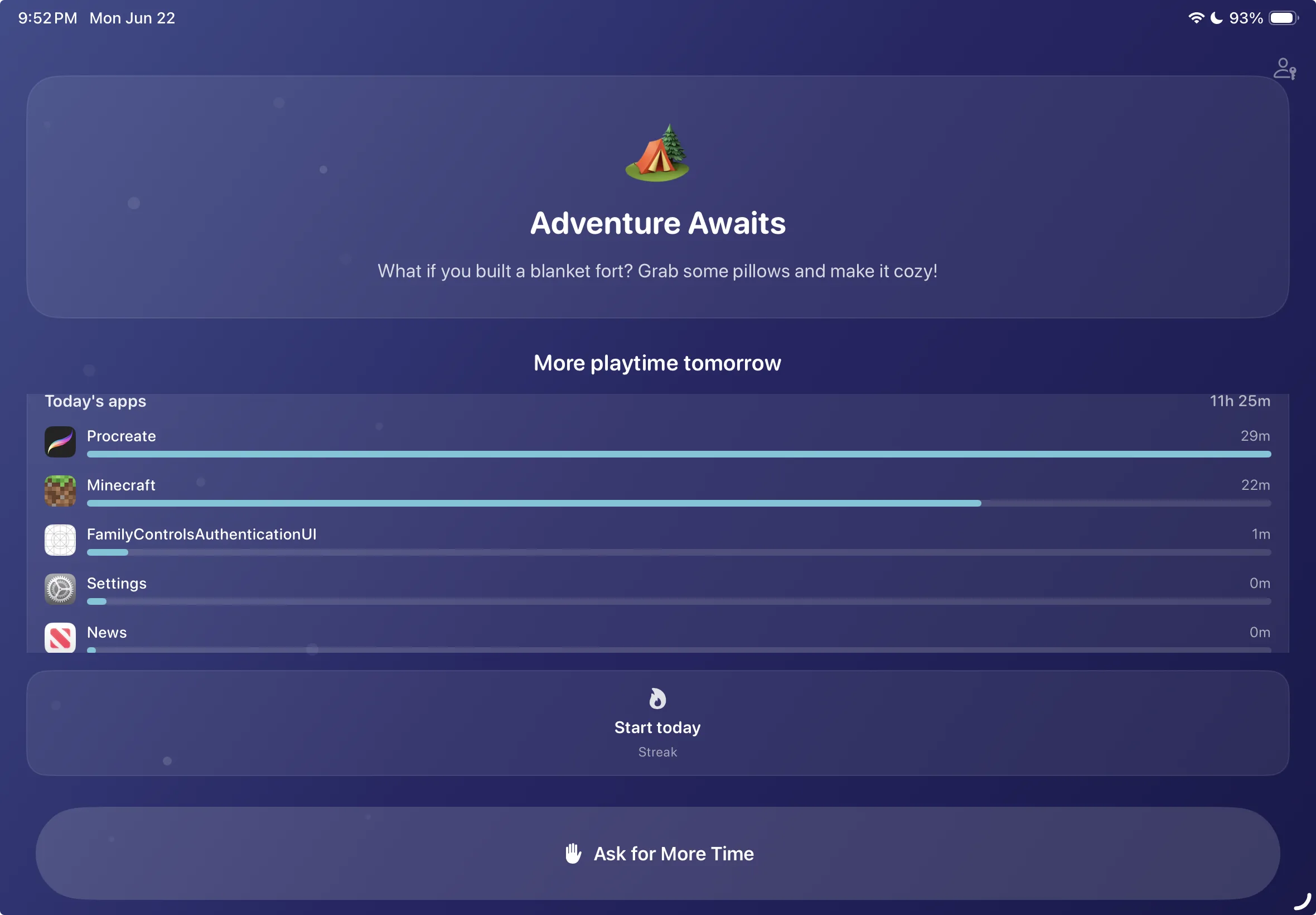
When time is up, Playful Pause turns the stop into a next step: a gentle prompt, tomorrow's reset, and a simple way to ask for more time if they really need it.

Suggests a real-world activity instead of a dead-end block.
Shows what happened today without turning it into shame.
Lets them ask, while the parent still decides.
Playful Pause kid screen suggesting a blanket fort after playtime is done
Actual child screen
Real cross-device control

A PC, a Switch, and an iPad. One budget.

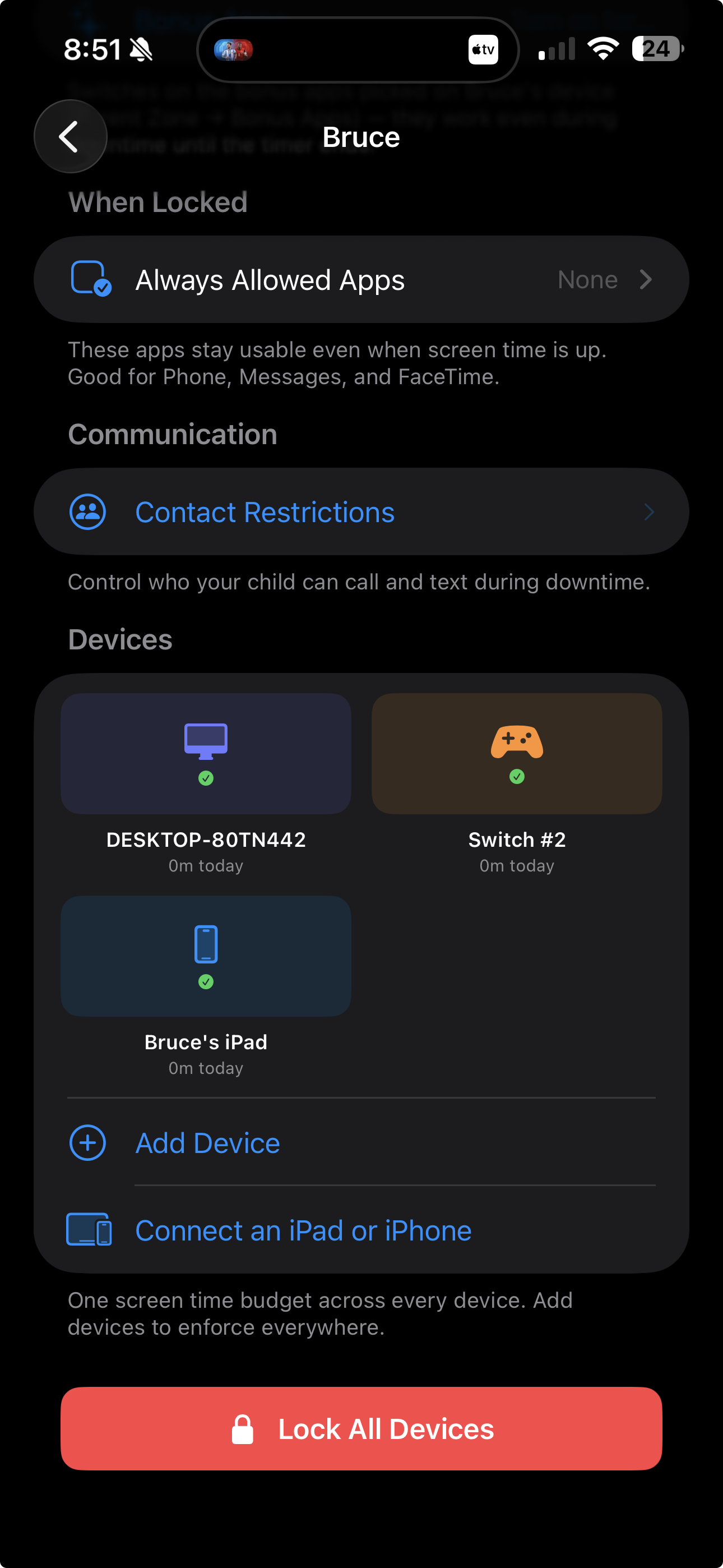
Bruce's live setup shows the point: one child, one budget, three very different screens. A gaming PC, a Nintendo Switch, and an iPad all report into the same place and can be locked together.

Gaming PC · Windows
Switch #2 · Nintendo Switch
Bruce's iPad · Apple Family Controls
Playful Pause showing Bruce's gaming PC, Nintendo Switch, and iPad under one shared screen-time budget
Actual app screenshot
Typical screen-time apps
Playful Pause
Hard cut-off → tantrum
Gentle wind-down → the kid stops on their own
Separate limits kids dodge between platforms
One shared limit across iPad, PC, and Switch
A wall of charts to police
One clear view, tap to approve more time
In-app timers kids learn to bypass
OS-level shields that hold through reboots
Setup in minutes

Set it once. It runs itself.

STEP 01

Pair the devices

Add the child's iPad, connect their Nintendo account, and pair the gaming PC. Each screen joins the same family budget.

STEP 02

Set one limit

Choose the daily playtime and wind-down time once. The budget drains across every paired device instead of restarting on each one.

STEP 03

Walk away

Limits apply on schedule. You only hear from it when someone asks for more time, or when you want to lock or unlock everything.

Not surveillance

It's structure, not a spy.

Playful Pause never sees your child's messages, location, or what they watch. It only stores the family setup, lock state, schedules, and the usage needed to run one shared budget across devices.

No ads, ever No trackers or data brokers No message or browser history Built for parent-managed devices
Good questions

The things parents actually ask.

No. On iPad, enforcement runs through Apple's Family Controls. On PC and Switch, the paired platform reports back to Playful Pause and follows the shared lock state. It is not just a timer inside the parent app.

The daily limit is a single shared budget across every paired device, not a separate timer per device. When the budget's spent, it's spent on the gaming PC, the Switch, and the iPad at the same time.

No. We never receive messages, location, or browsing history. Playful Pause stores only the information needed to run schedules, locks, device pairing, and shared usage totals.

They ask from their device and you get a notification. Approve it and minutes are added to the shared budget; hold it and nothing changes. You're always the one holding the dial.

End the daily screen-time fight.

Playful Pause hits the App Store soon. Add your email and we'll keep you posted.